Assignment 1: Cybersecurity Basics for Devices
Planning & Design
The goal of this assignment was to identify vulnerabilities on an Ubuntu VM, secure it using a firewall, and evaluate encryption. The objectives included:
- Scanning for open ports
- Enabling and configuring UFW
- Blocking insecure services (e.g., Telnet)
- Checking disk encryption status
This aligns with the CIA triad by improving:
- Confidentiality (through encryption)
- Integrity (by disabling unnecessary services)
- Availability (by ensuring required services remain online)
Technical Development
- I used the command:
netstat -tulnThis identified open ports.
Necessary Ports Identified: SSH (22), DNS (53), DHCP (68)
Unnecessary Ports Identified: CUPS (631), discovery services (5353), high ports (9843, 53443, 59686)
-
Installed and enabled UFW firewall:
sudo apt update && sudo apt upgrade sudo apt install ufw -y sudo ufw enable -
Blocked insecure Telnet:
sudo ufw deny 23/tcp -
Checked disk encryption:
lsblk -fOutput showed only ext4 and vfat, meaning no LUKS encryption.
Outputs
.png)

.png)
.png)
Testing & Evaluation
UFW was enabled and firewall rules applied successfully.
Ports were analyzed for risk; SSH (22) was the most likely attack target due to brute-force attempts.
Telnet was blocked to prevent plaintext credential attacks.
Disk encryption was not enabled, which is acceptable for a classroom VM but unsafe for real-world laptops.
Reflection & Professionalism
This assignment demonstrated how security controls directly protect devices:
- Every open port represents a potential risk.
- Firewalls act as a security guard for network traffic.
- Encryption ensures confidentiality, keeping data safe even if stolen.
I gained professional experience in configuring Linux firewalls with UFW and learned why insecure protocols like Telnet must be disabled. This directly connects to enterprise cybersecurity practices, where system administrators harden endpoints before deployment.
Assignment 2: Outdated Software Log
Planning & Design
The purpose of this assignment was to analyze installed software for outdated versions, evaluate the risks, and update them.
Planned steps:
-
Run version-check commands:
openssl version firefox --version libreoffice --version python3 --version apache2 -v gimp --version java -version ssh -V - Compare installed versions with the latest releases.
- Mark results as up-to-date or outdated.
- Use
sudo apt update && sudo apt upgrade -ybefore testing.
Technical Development
- Checked and recorded software versions in the log.
- OpenSSL was identified as the most dangerous if outdated, since it could allow attackers to break encryption.
- Updated Java and confirmed installation with
java -version.
Outputs
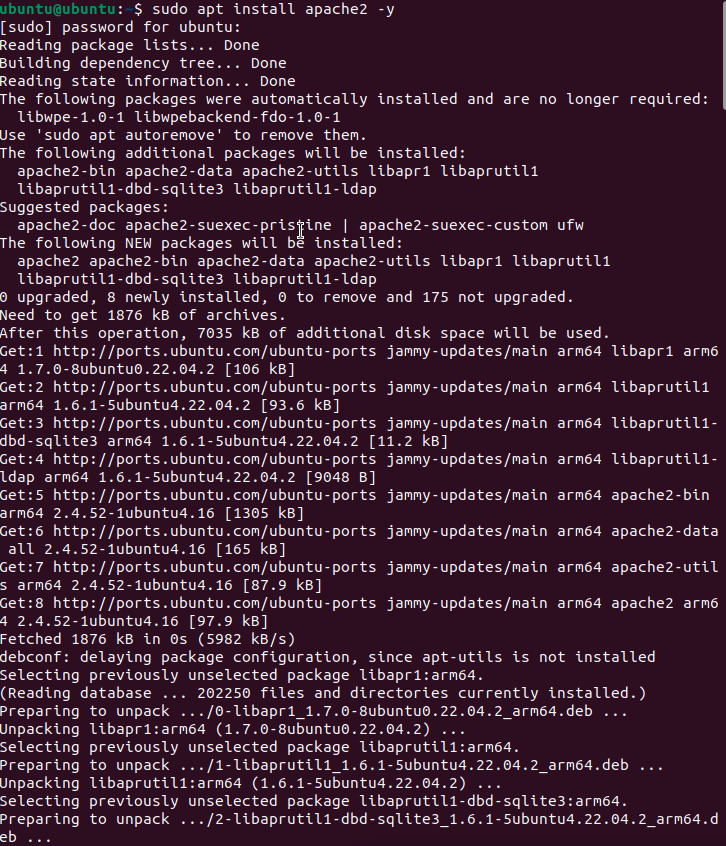
.jpg)
Testing & Evaluation
Outdated applications were detected and upgraded.
Risks identified:
- OpenSSL: could expose encrypted communications.
- Apache/Java: could allow remote code execution or malware injection.
- GIMP/LibreOffice: potential for malicious file exploits.
Updates were applied to eliminate vulnerabilities.
Reflection & Professionalism
This assignment reinforced the importance of patch management in cybersecurity.
- Outdated software is a common attack vector.
- Schools, hospitals, and businesses must update regularly to protect sensitive data and ensure compliance.
- On a real laptop, outdated programs could lead to malware, identity theft, or full system compromise.
I concluded that OpenSSL was the most critical to update, since weak encryption undermines the security of all communications. This connects directly to real-world cybersecurity work, where keeping systems patched is the first line of defense.
Assignment 3: Guided Notes – Cybersecurity Basics for Devices
Planning & Design
The purpose of this assignment was to create guided notes that summarize key cybersecurity concepts, provide analogies, and include hands-on practice steps. These notes were designed as a study and teaching tool to reinforce concepts such as the CIA triad, device vulnerabilities, CVE tracking, and social engineering attacks.
Planned focus areas included:
- Understanding the CIA Triad (Confidentiality, Integrity, Availability)
- Identifying device vulnerabilities (outdated software, weak passwords, open ports, unpatched systems)
- Learning how to check system versions on Ubuntu and macOS
- Tracking vulnerabilities through CVE reports
- Reviewing social engineering tactics and corresponding defenses
Technical Development
- CIA Triad Notes
- C = Confidentiality (keep data secret)
- I = Integrity (keep data accurate & trustworthy)
- A = Availability (keep data usable when needed)
- Examples and analogies were included to make these ideas more memorable.
- System Version Checks
- On Ubuntu, ran:
uname -a→ Output shows kernel version, build date, and system type.
- On Mac, ran:
system_profiler SPSoftwareDataType→ Output shows macOS version, kernel version, and build number.
These steps highlighted why version checks matter for patching and security.
- On Ubuntu, ran:
- Common Device Vulnerabilities
- Outdated operating systems → compared to not fixing broken locks.
- Weak passwords → like leaving the front door unlocked.
- Open ports → like doors/windows into a system (Port 80 = HTTP, Port 443 = HTTPS, Port 22 = SSH, Port 25 = SMTP, Port 110 = POP3, Port 143 = IMAP, Port 3389 = RDP, Port 53 = DNS).
- Unpatched software → explained as ignoring safety recalls.
- Vulnerability Tracking (CVE)
- Defined CVE as a global dictionary of known software flaws.
- Analogy: CVEs are like a “Most Wanted List” for vulnerabilities.
- Social Engineering Attacks
- Phishing = mass emails tricking users.
- Spear Phishing = targeted attacks.
- Pretexting = creating a false story.
- Baiting = offering free items/media.
- Tailgating = entering secure areas without authorization.
- Defenses
- Firewalls, Antivirus, Strong Passwords, Regular Updates, Security Training.
Outputs
- Guided Notes included fill-in-the-blank sections, analogies, and step-by-step tasks.
- Concept maps and structured outlines helped organize cybersecurity concepts.
Concept Map Placeholder:
.jpg)
Testing & Evaluation
The guided notes were effective for:
- Reinforcing technical commands by requiring hands-on checks on Ubuntu and Mac.
- Encouraging reflection through discussion prompts about risks of not updating.
- Connecting vulnerabilities to real-world analogies for better recall.
This made it easier to identify security risks such as outdated operating systems, weak passwords, and open ports.
Reflection & Professionalism
This assignment deepened my understanding of cybersecurity by blending theory, hands-on practice, and teaching tools.
Key takeaways:
- The CIA triad is the foundation of all security measures.
- Every outdated or unpatched system represents a serious risk.
- Social engineering shows that people, not just technology, are a critical vulnerability.
- By creating guided notes, I practiced not only learning but also communicating cybersecurity concepts clearly—a vital professional skill.
This assignment highlights how strong documentation and guided instruction are just as important in cybersecurity as the technical controls themselves.